


LG TV Remote Control app
3.516.00 Reviews
App Specs
- Version
- 1.3.7
- Updated On
- License
- Free
- Downloads
- 100,000+
- Developer
- FutureAppsTechnology
- Categories
- House & Home
- Platform
- Android
Screenshots
 Analysis by AppCompare
Have you ever found yourself frantically searching for the TV remote, only to discover it wedged between the couch cushions? Yeah, me too. That’s why I was pretty stoked to come across the LG TV Remote Control app. I thought, "Could this be the answer to my remote control woes?" Spoiler alert: It was pretty close!
Where I’d place it in a household
I see this as a convenience app first, not a replacement that every household should depend on. If your phone is already beside you, using it to adjust the volume or move through a menu can be easier than getting up to find the handset. It is especially useful in a room where the remote regularly gets borrowed, misplaced, or left on the other side of the sofa.
A realistic example is settling in for a film, then realizing you need to search for a title or switch inputs. Rather than pause the evening to hunt for the remote, you can reach for your phone and use the app’s controls. That kind of small interruption is where a phone remote earns its place. I would still keep the physical remote nearby for guests, children, or anyone who does not want to use a phone to control the TV.
What the trust question really means here
Because this app is designed to interact with a television, I would think about trust in practical terms: what the app asks me to allow, what I choose to connect it to, and whether I am comfortable using a phone as a control surface. I would review the permission prompts on my own device before granting anything, and I would avoid approving a request that does not make sense for the feature I am trying to use.
I would also treat pairing as a deliberate household choice. Connecting to a TV is different from simply opening a calculator, because commands can affect what is playing or change the viewing experience for anyone in the room. Before pairing in a shared home, I would make sure I have selected the right television and that other household members are comfortable with phone-based control.
How it compares with the usual options
The obvious alternative is the TV’s physical remote. That remains the simplest choice when you want a dedicated set of buttons, do not want to unlock your phone, or need a controller that another person can pick up without setup. The app’s advantage is having controls and text entry on a device that is often already in your hand; its trade-off is relying on that phone and a successful connection.
Compared with using a general-purpose remote, this app is a more direct fit for someone who wants to manage an LG TV from a phone. A universal physical remote can be more convenient if several brands or devices need one handset, while a phone app can reduce the number of objects on the coffee table. I would choose based on the actual room: if the TV is shared and several people need instant access, keep a physical remote; if you mainly want a backup or easier searching, the app makes more sense.
Worth Reading Before You Choose

EA SPORTS FC Mobile 26 Is a Bigger Football Game, but It Takes Time

Flipboard Shows What News Apps Must Do Beyond the Feed

Switching to Android Auto Means Rethinking Your Driving Routine

Google Calendar Makes a Crowded Week Easier to Manage

Ludo King Makes the Most of the Minutes Between Plans

Baby Panda World Brings Quick Play to Modern Phones, but Its Game Library Feels Busy
Small habits that make it more useful
One useful habit is to check the selected TV before sending a command, especially if there is more than one LG set in the home. A volume change or input switch meant for the living-room TV can be confusing if the app is pointed at a bedroom set instead. I would also keep the phone within comfortable reach before starting a search, so text entry feels like a shortcut rather than another device to fetch.
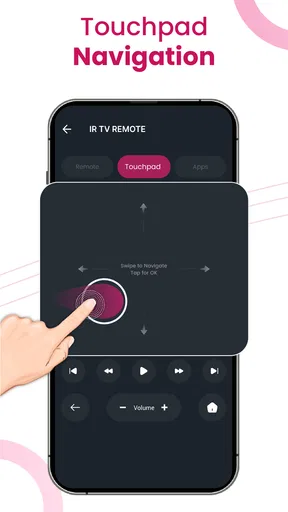
For shared viewing, I would use the touchpad for broad menu navigation and switch to the physical remote if precise button-by-button control feels easier. That is a practical trade-off, not a flaw in every situation: swiping is quick for moving around, while physical buttons can be more predictable when you are trying to make one exact selection without overshooting.
First Impressions and Setup
Okay, let’s dive into the nitty-gritty. Setting up the LG TV Remote Control app was surprisingly straightforward. I simply downloaded it from the Google Play Store (it’s available on iOS too, by the way) and followed the on-screen instructions to sync it with my LG Smart TV. It took me all of five minutes. No elaborate tech knowledge required, which is a win in my book!
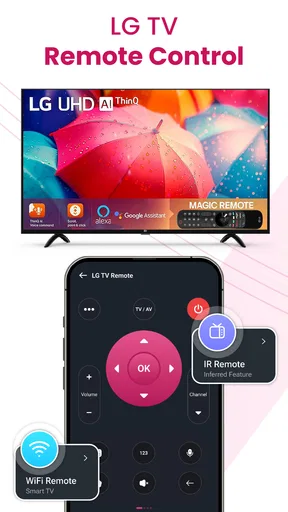
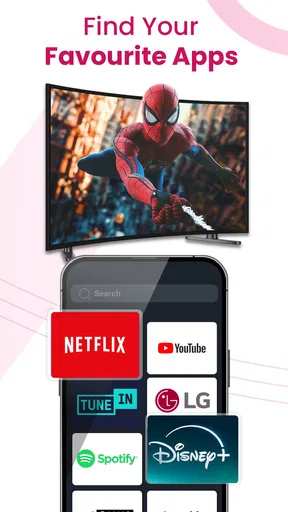
The interface is sleek and intuitive. You’re greeted with a layout that mimics a traditional remote, but with a few handy extras. It’s got all the basics like volume control, channel navigation, and input selection. But what really caught my attention were the extra features, like the ability to launch apps directly from the remote. More on that later!
Getting to Know the Features
Once I was all set up, it was time to explore the features. One standout is the touchpad functionality. Instead of pressing buttons, you can swipe and tap, which feels oddly satisfying. It’s like using a high-tech gadget from a sci-fi movie. Plus, it’s super responsive, so no lag time when you’re trying to change the channel in a hurry.
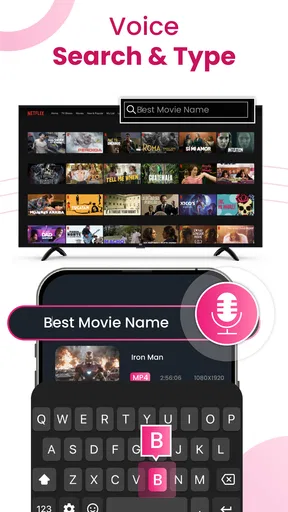
Another feature I found useful was the keyboard. If you’ve ever tried typing with a traditional remote, you know it’s a headache. But with the app, typing in search bars or logging into streaming apps is a breeze. You can even use voice input, which is like having your own personal assistant ready to fetch your favorite shows.
Performance in Daily Use
In terms of daily use, the app did not disappoint. I was worried it might drain my phone’s battery or require constant reconnections, but neither was the case. The app runs smoothly, and the connection to the TV was stable throughout my testing.
I also appreciated the ability to control multiple LG TVs from one app. If you’re someone with more than one TV in the house, this feature is a lifesaver. You can switch between TVs without any fuss, which is perfect for managing different rooms or if you’re hosting a party and need to control everything from one place.
What it means to use it carefully
My approach to any phone-based remote is to keep control intentional. If I am handing my phone to someone so they can choose a programme, I would first make sure the app is on the correct TV and the person knows which controls affect playback or sound. That avoids accidental changes during a shared evening and keeps the phone from becoming a surprise second remote for the wrong room.
There is also a simple privacy boundary worth keeping in mind: typing or speaking through a phone can be convenient, but I would be mindful about entering account details while other people are nearby. A physical remote may be preferable for a quick menu action when I do not want to use a phone keyboard or voice input. The useful choice depends on the moment, rather than assuming one control method is always best.
Who should think twice
I would hesitate to rely on this app as the only controller if the TV is used by people who do not have access to my phone, if the phone is often out of reach, or if a household needs a simple shared control that works without someone opening an app. It also makes less sense if I use several television brands and want one consistent control method for all of them; a universal handset may suit that setup better.
It is worth approaching older sets with patience, too. The app can be less dependable with some older LG models, so I would test the connection before putting the physical remote away. If pairing does not behave as expected, the sensible fallback is the TV’s own handset rather than spending a viewing session repeatedly troubleshooting.
Practical questions before installing
Will it replace the remote completely? I would not count on that. It is best treated as a handy backup and a better way to enter text, while the physical remote remains useful for guests, quick access, and situations where the phone is unavailable. Does it work only with one television? The app can handle multiple LG TVs, which is helpful in a multi-room home, but I would still check the selected set before using it.
Is it free to try? The app is free to download, with in-app purchases ranging from under a dollar to just over a hundred dollars per item. I would look carefully at any purchase screen before continuing and only pay for something I specifically want. It is rated for everyone and is made by FutureAppsTechnology. Its average rating is 3.3 from around 437 ratings, with over 100,000 installs, so I would treat it as a useful option that may not suit every device or household rather than assuming it will be flawless for all users.
Room for Improvement
Of course, no app is perfect. While the LG TV Remote Control app is pretty solid, there are a few areas where it could improve. For instance, the app sometimes struggles with older TV models. If you have an older LG TV, you might encounter some connectivity issues, which can be a bit frustrating.
Additionally, while the touchpad is great, it can be sensitive at times. A slight swipe might send you flying through channels faster than you intended. It’s not a deal-breaker, but it’s something to be aware of, especially if you’re prone to heavy-handedness.
Version and fit over time
The app is currently at version 1.3.0, with a release date of February 5, 2025, and it supports devices running Android 7.0 or later. I would check compatibility on the device I plan to use before building it into my routine. That matters most in a household where an older phone is kept as a shared controller, because a phone that cannot install the app is not a reliable backup.
For me, the best test is a short trial during an ordinary viewing session: pair the TV, try volume and navigation, then see whether text entry is genuinely easier than using the handset. If the connection feels reliable and the controls suit the people who share the room, keep it installed. If it adds extra steps or the TV is not a good match, going back to the physical remote is a perfectly reasonable decision.
Final Thoughts
Overall, the LG TV Remote Control app is a nifty tool that can genuinely make your TV-watching experience more convenient. It’s a modern solution to the age-old problem of losing the remote, and it comes with enough features to justify its place on your smartphone.
Whether you’re a tech enthusiast or just someone who loves a bit of extra convenience, this app is worth a download. It might not completely replace your physical remote, but it’s a fantastic backup. So, if you’re tired of playing hide and seek with your remote, give this app a try. You might just find it’s the best thing since sliced bread… or at least since the invention of the remote control.
Pros
- Easy setup with quick pairing.
- Intuitive interface for smooth navigation.
- Supports multiple LG TV models.
- Customizable remote layout.
- Voice command feature available.
Cons
- Occasional connectivity issues.
- Ads can be intrusive at times.
- Limited functionality on older TVs.
- Some features require in-app purchases.
- May drain battery quickly.
FAQs for LG TV Remote Control app
What features does the LG TV Remote Control app offer?
The LG TV Remote Control app provides a variety of features including channel changing, volume adjustment, and access to smart TV functionalities. It also supports keyboard input for easier text entry and allows you to control multiple LG TVs from a single device. Advanced options like voice control and touchpad navigation enhance user experience.
Is the LG TV Remote Control app compatible with all LG TV models?
The app is compatible with most LG smart TVs, particularly those released in recent years. However, compatibility may vary depending on the TV model and its software version. It's recommended to check the app's compatibility list or the LG website to ensure your TV model is supported before downloading.
Does the LG TV Remote Control app require an internet connection to function?
Yes, the app requires an internet connection to communicate with the TV. Both the TV and your mobile device need to be connected to the same Wi-Fi network. This ensures smooth operation and allows you to access smart features like streaming services and app navigation.
Are there any in-app purchases or ads in the LG TV Remote Control app?
The app is generally free to download and use, but it may contain ads. Some advanced features might require in-app purchases. It's advisable to review the app's description in the app store for details on any additional costs or subscription plans that could enhance functionality.
How user-friendly is the LG TV Remote Control app for beginners?
The app is designed to be user-friendly, with a straightforward interface that mimics a physical remote. It includes intuitive icons and menus, making it easy for beginners to navigate. Additionally, there are tutorials and help sections within the app to assist new users in getting accustomed to its features.


